This morning I noticed that my iPhone and Apple Watch claimed that the alarm had gone off two minutes late, which seemed improbable.
I checked the time on the iPhone against the official US Government time and discovered that the iPhone was nearly two minutes fast, which should be impossible.
Unless, of course, the phone wasn’t synchronizing itself to network time, which it obviously wasn’t.
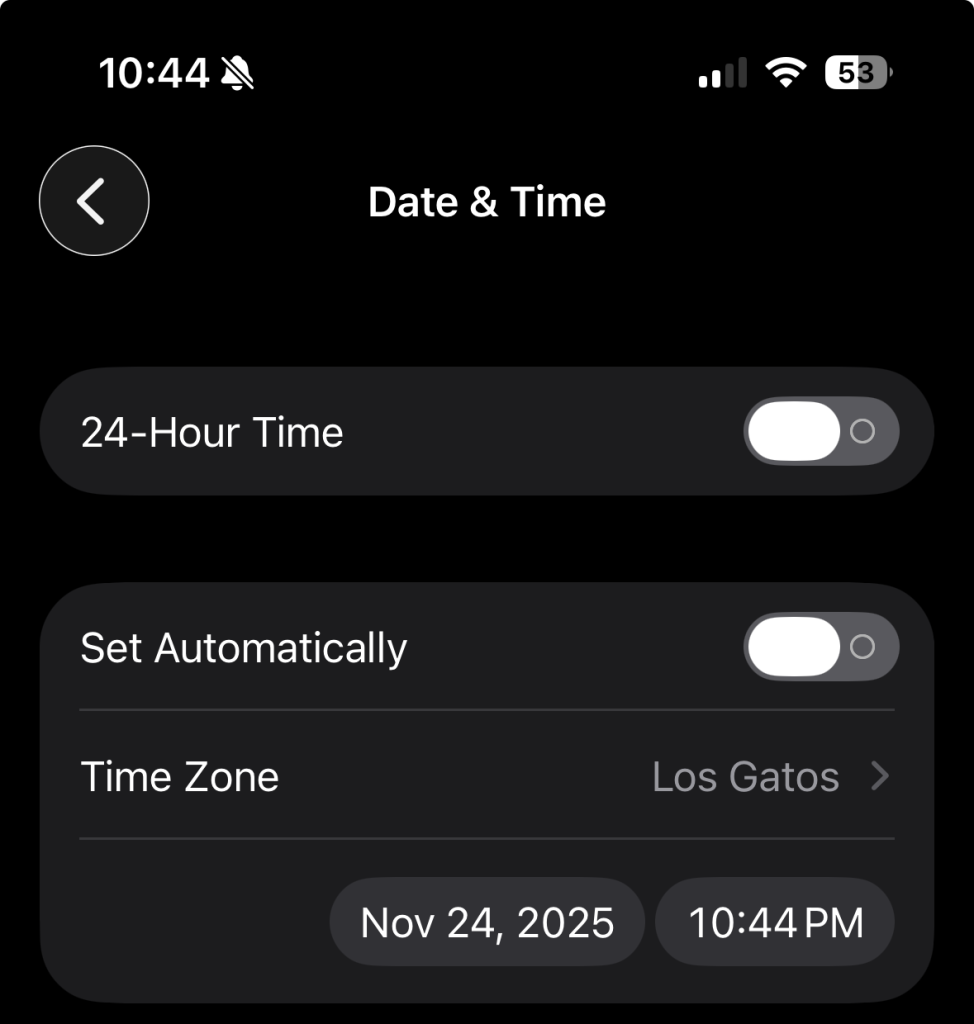
A little thought (after coffee) gave me the answer. I hate getting on an airplane and having the iPhone and my watch reset themselves to whatever timezone the wifi on the plane is supplying, so I turn off the automatic setting and change the timezone myself. Little did I know that I was also telling the phone not to synchronize the time at all – and after a few months, it had drifted enough to be noticeable.
I could have fixed the problem by manually resetting the time and date using the little boxes at the bottom of the picture, but it’s easier to just let the phone do it all – I may still turn off the automatic setting the next time I get on a plane, but I will be damn sure to turn it back on when I get to my destination!
Don’t know about IPhones, but with my Android, I always have the time zone NOT synchronized, but the time is. When we fly, I change the timezone to our destination time zone, after we take off. When we drive across timezones, we either change it first thing in the morning, or when we arrive. We got totally messed up in the Guadalupe Mountains many years ago, and hiked out earlier than we needed to, so didn’t go as far as we could have. We started hiking in Mountain Time and it changed to Central Time while we were out.
It seems to be all or nothing on the iPhone. I’ll have to file a bug report. :-)