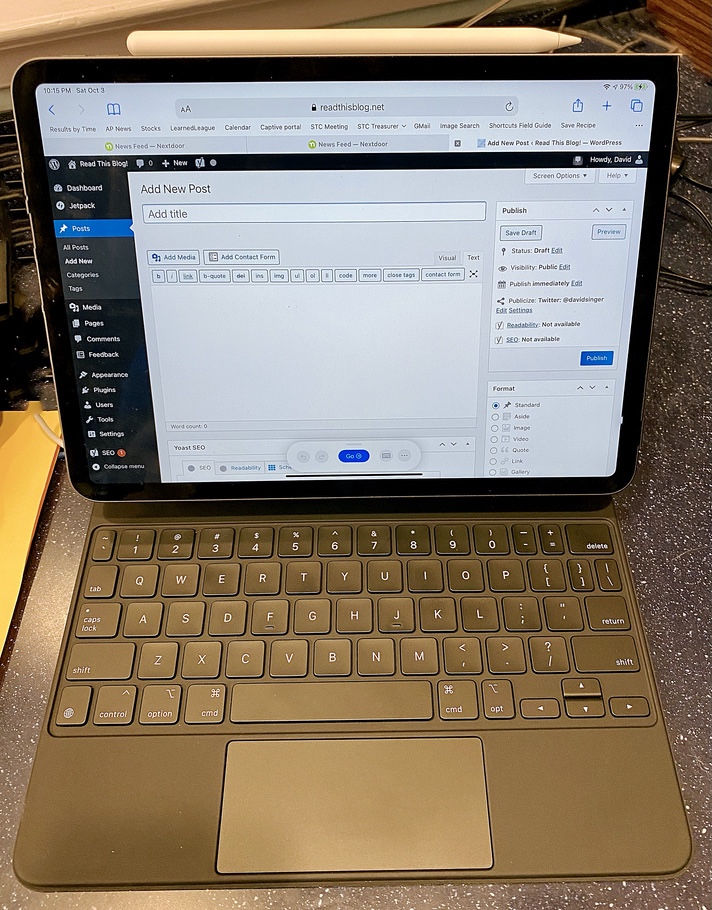
I created yesterday’s entry entirely on the iPad (except for the photo of the iPad, of course, which I took on the iPhone); I even used the WordPress app to upload the photo and entry to my blog. It was a bit clunkier than doing the work on the Mac and using the web interface to WordPress, but it wasn’t bad at all.
Soon after I uploaded the entry, though, I realized that I hadn’t removed the GPS coordinates from the photo – and that meant our house’s location was out in the world for anyone to harvest! I’m sure it’s not all that difficult to find out where we live anyway, but there’s no sense in publishing it unnecessarily.
I was stubborn and still didn’t want to use the Mac, so I figured out how to create an iOS Shortcut to strip the metadata and reposted last night’s photo, but I had to delete all the metadata, and it was a manual process – both of which seemed like a mistake.
What I really wanted was a way to automatically strip the GPS data from photos as I uploaded them to WordPress, but only if they were taken fairly close to our house. I didn’t find any plugins that seemed to fit the bill, so I started writing one.
This, of course, meant that I’d have to do the job in PHP, a language I’ve never used. But PHP is close enough in spirit to Python that it wasn’t too hard to suss out what I needed to do; it helped that PHP has native support for reading EXIF data in images.
Click here to see what I’ve written so far:
#!/usr/bin/env php
<?php
if ($argc >= 2) {
  $target = $argv[1];
}
else {
  $target = "IMG_6671.jpg";
}

function dist_between($lat1, $long1, $lat2, $long2) {
    // Computes distance in kilometers between two points using the haversine formula
    // Points are given in decimal degrees
    $l1 = $lat1 * M_PI / 180;
    $l2 = $lat2 * M_PI / 180;
    $deltaLat = ($lat2 - $lat1) * M_PI / 180;
    $deltaLong = ($long2 - $long1) * M_PI / 180;
    $a = (sin($deltaLat/2) ** 2) + cos($l1) * cos($l2) * (sin($deltaLong/2)**2);
    $c = 2 * atan2(sqrt($a), sqrt(1-$a));
    $d = 6371 * $c;
    return($d);
}

function evaluate_rational($rational) {
  $item = explode('/', $rational);
  return (float)$item[0] / (float)$item[1];
  }

function convert_location($location, $ref) {
  $loc = evaluate_rational($location[0]) +
         evaluate_rational($location[1]) / 60.0 +
         evaluate_rational($location[2]) / 3600.0;
  if ($ref == 'S' or $ref == 's' or $ref == 'W' or $ref == 'w') {
    $mult = -1;
  } else {
    $mult = 1;
  }
  return $mult * $loc;
}

$exif = exif_read_data($target);
if ((array_key_exists('GPSLatitudeRef', $exif)) and
    (array_key_exists('GPSLongitudeRef', $exif)) and
    (array_key_exists('GPSLatitude', $exif)) and
    (array_key_exists('GPSLongitude', $exif))) {

  // Let's pick up the information.
  $lat = convert_location($exif['GPSLatitude'], $exif['GPSLatitudeRef']);
  $long = convert_location($exif['GPSLongitude'], $exif['GPSLongitudeRef']);

  // Home is a constant here, though it shouldn't be.
  $hlat = 38.8976633;
  $hlong = -77.0365739;

  // and so is the critical distance: 0.5km;
  $cdist = 0.5;

  // get the distance between home and the photo, and if it's less than the critical distance, wipe GPS.
  $dist = dist_between($lat, $long, $hlat, $hlong);
  if ($dist <= $cdist) {
      echo $target, " delete ", $dist, " is less than ", $cdist, PHP_EOL;

      $cmd = "exiftool '-gps*=' " . $target;
      echo $cmd, PHP_EOL;
      exec($cmd, $output);
      foreach($output as $row) {
          echo $row, PHP_EOL;
      }
/*
  } else {
      echo "Not deleting ", $dist, " is more than ", $cdist, PHP_EOL;
 */
  }

}

?>
The observant among you will notice a few things about this code:
- It is not a WordPress plug-in
- It has hard-coded values for“home” and the radius of “nearby”
- It is undoubtedly VERY VERY bad PHP
However, it worked – I was able to use it against my existing WordPress media directory to strip the coordinates from about 10 images that I’d taken at home or within 500 meters of home.
The next step is to turn the code into a plugin so that I don’t have to think about it any more. But that’s for later this week.